More Than Four

Areas of Interest, as counted by my cat

Page 9 of 13

Reason #702 to avoid Windows Vista

The File Types tab has been removed from Folder Options. This feature was available from Windows 95 up to Windows XP and Windows Server 2003.

The File Types
tab allowed users to change the file associations for various types of
files. It allowed configuring which application would open when a user
clicked on a certain type of file, or allowed manually defining a new
file extension, defining/editing custom secondary actions, showing
extensions only for specific file types, or customizing the file icon.
While there is a more simplified option to change the file
associations, called Default Programs in the Windows Vista
Control Panel, this option only allows users to change the default
action that occurs when they double click a file. It does not allow
users to choose which application would load if the user were to right
click on a file and then choose a secondary option such as Edit.

The Open With dialog box in Windows Vista also uses the corresponding Default Programs API which limits only one registered application to be set as the default program. It is also not possible to navigate/jump to a particular extension
using the alphanumeric keys on a keyboard; scrolling is required.

http://en.wikipedia.org/wiki/Features_removed_in_Windows_Vista#Windows_Shell
Thank you Derek Crudginton

This is exactly what I needed to know:

Installing Oracle 10g r2 on Solaris 5.11 is painless except before
you ./runInstaller you have to edit the ./install/oraparam.ini and
change line 42 to something like:

Solaris=5.8,5.9,5.10,5.11

Then it will pass the first check and continue with install.

Essential Software List 2007

Time for a round-up of the Free and/or Open Source tools I've been using on my work laptop.

1. Eclipse 3.3 (IDE, Java and generic)

I've been dipping into various versions of Eclipse for Java
development for years. Its plugin architecture is brilliant (see
below). Out of the box it handles Java development as sweetly as any
"Professional" edition out there. It also has a built-in editor for Ant
build files (an XML dialect) which I'm finding particularly handy right
now. One feature I really appreciate is the ability to create a
"generic" project that basically just lists all the files in a
directory, regardless of what type of file they are. Very handy for my
current work which involves a series of versioned directories
containing  various flavors of text files. Which brings me to:

2. Afae Plugin for Eclipse

"Afae" stands for "Another Freebooter's All-purpose Editor". It
doesn't appear to be under active development and has stalled at
version 0.9, but don't let that stop you from using it. It adds a TextMate-flavored
text editor to Eclipse that allows me to edit .sh, .bat, .sql, and
other types of files in syntax-colored goodness. It has a bunch of
other features that I'm not using (such as a "post to blog" button on
the toolbar?) but I've found the text editing to be solid.

3. DiffMerge

I've mentioned this before.
Since then it is up to version 3.1 but it is still free, and although
other file comparison tools probably have more features, I've grown to
like this one.

4. AstroGrep

I have long ago given up on making Windows Search
find anything on my file system. How I long for the File Manager applet
in FoxPro for DOS 2.0. That thing was fast. AstroGrep is a GREP utility
for Windows, with a simple UI on top. It's fast, and I can search the
contents of text file with regular expressions. On my latest project I have found it invaluable.

Diffmerge

DiffMerge is a tool recently made freely available from SourceGear. If you are not a programmer then you probably have no need of this, but if you do find yourself needing to compare two different versions of source files, then I recommend this tool

I used WinMerge for a while, but the other day I needed to do the file comparison thing and I found that on my laptop, not only had I not installed WinMerge, I didn’t have an installer conveniently located in my c:\downloads folder either.

Since I regularly read Eric Sink’s Blog, I knew about DiffMerge, and so I gave it a try.

It’s excellent. It blows WinMerge out of the water. Recommended.

Editor’s Note, August 2020: Actually, I’ve ended up using both WinMerge and DIffMerge over the years. Perhaps WinMerge more. I would like to take back what I said here – they are both excellent tools and WinMerge perhaps has the edge but DiffMerge I still found handy for quick comparisons.

Threatening Software

No, not viruses. I mean, what do you do when the software you depend on stops working? For example, today Outlook 2003 just refused to send mail to our SMTP mail server. It would say “timeout, server not responding” or some such. Oh, and there was a nasty Hex number associated with the message that you’d think would help when you google it, but no. No good advice from the Goog. Instead, just stupid stuff I’d already tried, like “change the ports” or “delete the account configuration and re-enter the authentication details”, and the old chestnut, “reboot your computer and see if the problem goes away”.

I even got onto a web chat session with my ISP support dude, who said *he* had no problem sending and receiving email from that account.

Only one thing worked. I set up my email account in Mozilla Thunderbird. It send test messages flawlessly. Then I went back to Outlook. Still no joy sending outgoing mail. That’s when I said it, “OK. I guess I’m switching to Thunderbird for my email from now on, then *sigh*.”

Next time I pushed send/receive in Outlook, it worked.

Expression Web vs Visual Studio 2005

I’m happy to know that Visual Studio .NET 2008 (“Orcas”) is going have the HTML designer from Expression Web built-in. It’s much better than the editor in VS 2005.

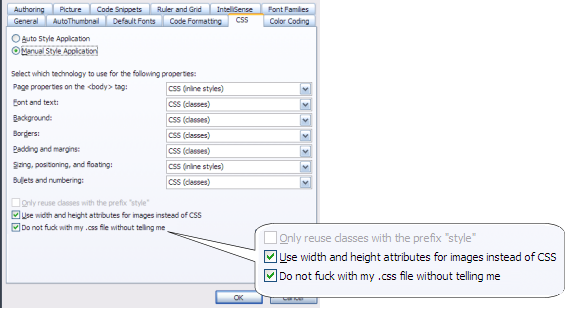
Unfortunately my copy of Expression Web appears to be missing the third checkbox in the CSS options dialog, shown below:

Can anyone tell me where to find it?

An alternative to checkboxes for logical fields in Grids

I’ve never really been happy with how checkbox controls look when contained in Grid columns, displaying logical values. Lately I’ve been using the method described below.

Given a table with a logical column such as:

create cursor FILMLIST values ( VIEWED L, TITLE C(50) )

I use an expression for the grid column instead of referencing the table column name directly:

Alignment=2-(Middle Center)
ControlSource = iif(FILMLIST.VIEWED,"ü"," ")
FontName=Wingdings
FontSize=11
ReadOnly=TRUE

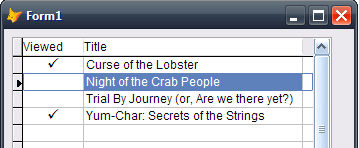
The default textbox control in the column will display the logical value as a tick mark (the WingDings character for ü):

This is all you need to do for a read-only column. For my users, I make the column editable by adding some code to the textbox’s .DblClick() event:

replace FILMLIST.VIEWED with !nvl(FILMLIST.VIEWED,.F.)
this.Refresh()

This toggles the logical flag when the user double-clicks the mouse in the column – and handles possible NULL values as well.

As an exercise for the student, try adding support for toggling the flag using the keyboard SPACE bar.

« Older posts Newer posts »

© 2026 More Than Four

Theme by Anders NorenUp ↑